Request customer files
Send a branded intake link for the artwork, size, sides, material, and notes your team needs before prepress starts.
AI Print Ready Files is print shop proofing software for collecting customer artwork, checking production risks, preparing the file, comparing proof versions, recording comments, and capturing a clear approval. The proof stays connected to the size, sides, pages, bleed, and current artwork revision instead of becoming another attachment in an email thread.
Customer proofing
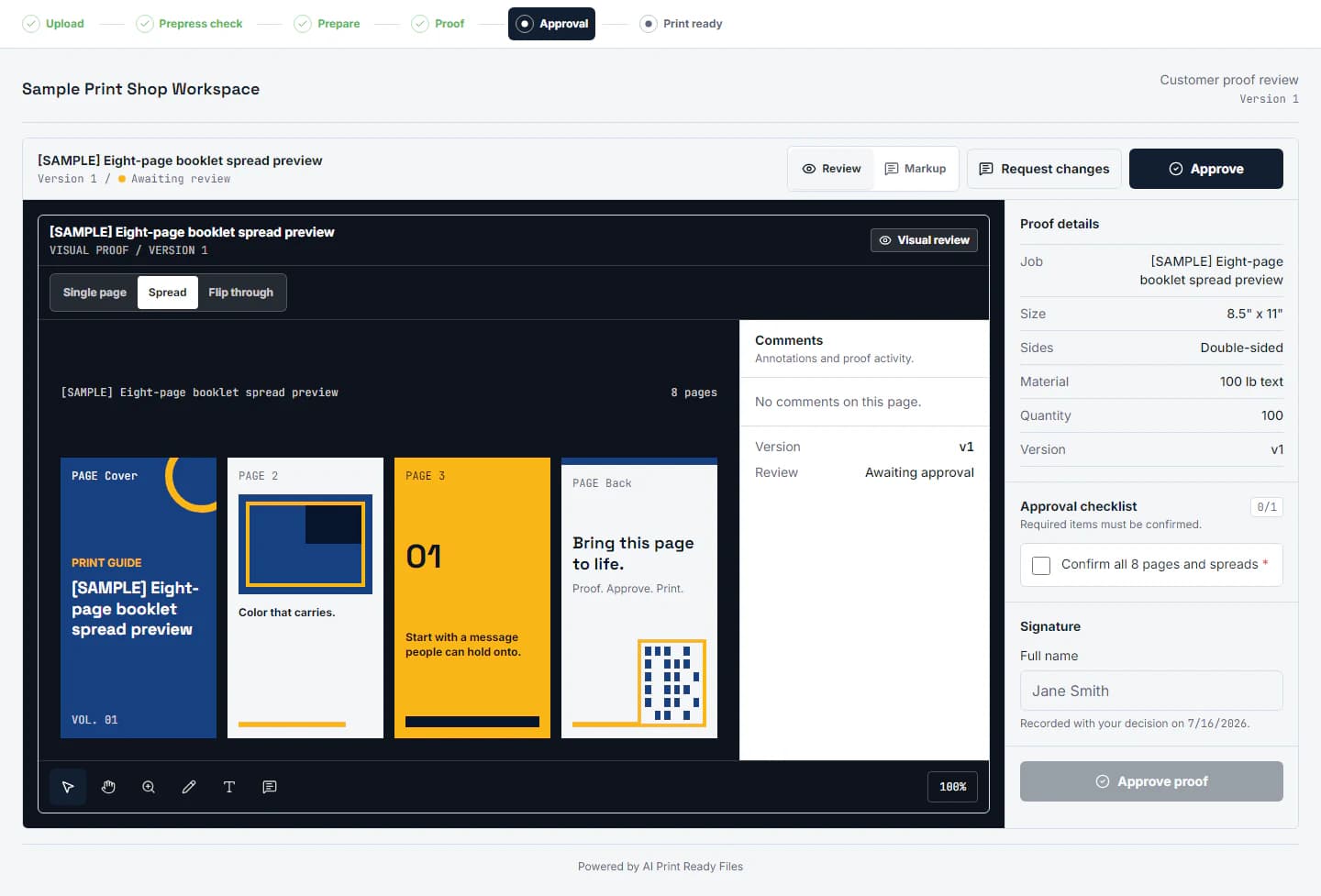
Approve the named revision, not an email attachment.
Pages, spreads, comments, production context, and the approval record stay together.
A shop does not only need a comment thread. It needs a usable file, proof context, customer answers, and a record of exactly which version was approved. The job workspace keeps that chain together.
Send a branded intake link for the artwork, size, sides, material, and notes your team needs before prepress starts.
Run the same file checks customers use for free, then decide whether to fix the file, request a replacement, or move it into proofing.
Show the prepared file with the job specs, warnings, and revision history so the customer approves the actual output path.
Capture typed-name approval, checklist answers, timestamp, IP, user agent, and proof version so the decision is not buried in email.
Online proofing software should shorten the distance between “the customer sent something” and “the exact production revision was approved.” A comment pin by itself is not enough. The shop needs to know what product is being ordered, which artwork slot the file fills, whether the source can reproduce at the requested size, which prepared file the customer is seeing, and which decision moved that revision forward.
The process begins before a proof exists. A structured customer artwork intake workflow asks for the front, back, logo, mailing panel, booklet, or other named file under the correct job. The target size and production notes travel with the upload. That is different from receiving an attachment called “final-v7-new.pdf” with no dependable relationship to the order.
Use job-specific requests, named artwork slots, accepted-format guidance, expiration, and a visible receipt so the customer knows what arrived and what is still missing.
Show final dimensions, sides, pages, bleed, safe areas, file warnings, and the current prepared revision beside the artwork rather than in a separate estimate or email.
Give the customer one current proof and a clear approve-or-request-changes choice. Preserve the approver, answers, time, proof version, and decision record.
Creative review software is often designed around campaigns, videos, web graphics, packaging concepts, and internal routing. Those systems can be excellent at comments and approvals, but a print shop has additional mechanical questions. Is the proof one side or both sides? Is the PDF showing single pages or printer spreads? Does the selected crop remove a phone number? Is the logo inside the safe area? Is 170 effective PPI acceptable for a distant banner and unacceptable for a close-viewed brochure?
Print proofing software should expose those facts without forcing customers to learn prepress terminology. The customer can answer plain questions about spelling, size, crop, colors, pages, and placement while the operator retains the technical report. The print proof approval checklist explains which customer decisions belong in the proof and which material or press decisions still belong to the shop.
A proof is also not the same as preflight. Preflight checks the file against technical rules; proofing shows a named revision for human review. Both are needed. The free preflight check can identify size, resolution, bleed, transparency, and file-structure risks before a shop spends time building a proof around a source that cannot support the order. The effective DPI guide explains why that resolution decision must use the final physical size.
Search results for proofing software mix lightweight approval tools, broad enterprise creative-review platforms, packaging systems, and print-specific portals. Compare the workflow your team actually has, not the longest feature list. A small commercial printer may gain more from organized intake and preflight than from multi-department campaign routing. A large agency may need complex reviewers and permissions that go far beyond print production.
Can the tool request named files under a real job, or does it begin only after staff manually organize the attachments?
Can staff and customers identify the one current proof while preserving prior revisions and comments?
Does the review show size, pages, sides, bleed, crop, and file warnings, or only a generic image canvas?
Does approval bind to a specific proof version with answers and identity evidence, or become an unstructured comment?
Use the customer artwork intake guide to map the file request, revision, proof, and approval steps your shop needs before comparing software.
The customer-facing proof should be simpler than the operator workspace. A buyer needs to open the current proof, move through pages or sides, add specific comments, read the requested checks, and make one clear decision. The shop needs the deeper history: which source arrived, which warnings were reviewed, which prepared artifact became the proof, which version the customer saw, and what changed after a revision request.
Token-gated proof links let a customer review the intended job without creating a general shop account. The link is scoped to that proof, and the workspace preserves the production trail behind it. Branded intake and proof surfaces can use the shop logo and brand color while controlled embed origins reduce the chance that customer-facing views are placed on an unapproved domain.
This is the same reason structured artwork requests outperform a shared inbox. The article on collecting customer artwork without email chaos shows how named slots, revision ownership, upload receipts, and production status reduce the recurring “which file is final?” problem before proofing even begins.
Print Shop is for teams that repeatedly collect customer artwork, prepare it, send named proof versions, and need the approval record later. If you only need to check or prepare your own files, start with the free scan, a one-off pack, or an individual plan.
Review Print Shop pricingBranded intake links, automatic preflight, the job workspace, immutable proof versions, page markup, version comparison, and approval records are implemented. The shop still owns final production review, and unsupported booklet profiles remain manual rather than being labeled print-ready.
Revision history is one of the main reasons to buy proofing software instead of collecting approvals in email. Every proof version should point to the source and prepared artwork used to create it. When a change request arrives, the next proof becomes a new named revision. The prior proof remains visible as history but no longer competes with the current decision.
Version comparison should help reviewers answer a specific question: did the requested change happen without introducing a new problem? For a booklet, that can mean comparing pages or spreads. For a card, sign, label, or garment graphic, it can mean checking a corrected phone number, moved safe-area element, revised crop, or replaced logo while the rest of the layout remains stable.
Comments also need page and revision context. “Move this left” is only useful if the system preserves which object, page, side, and proof version the reviewer was viewing. A later revision can resolve or supersede that note without erasing the history. The operator can then see whether every requested change was addressed before sending the next proof.
Approval closes that loop by binding the customer decision to the exact proof version. The record should not float independently from the file. If artwork changes afterward, the old approval remains evidence for the old version and the new version requires its own review. This protects both the customer and the shop from relying on an answer that applied to different artwork.
The approval record confirms what the customer reviewed. It does not certify paper, ink, equipment, finishing, installation, color contract, or unsupported imposition. Those final production controls remain with the operator and receiving workflow.
The Print Shop workspace is designed for commercial printers, sign shops, apparel decorators, promotional-product teams, in-plant departments, and production groups that repeatedly collect customer artwork and need a defensible approval before output. It is especially useful when staff currently switch among email, cloud folders, PDF comments, estimates, and a separate job board to answer one basic question: is the current file approved and usable?
The tool does not replace estimating, an MIS, RIP software, color-management instruments, or the operator’s final production judgment. It organizes the artwork decision around those systems. Unsupported booklet profiles, special finishing, unusual imposition, contract color, and device-specific checks remain controlled by the shop rather than being labeled ready automatically.
Security and retention belong in the buying decision too. Customer upload and proof links should remain scoped to the intended request, stored files should not become a public bucket, and the shop should know how long sources and outputs are retained. Upload validation, malware scanning, signature checks, active-content rejection, and authorized downloads reduce the risk that a convenient customer portal becomes an uncontrolled file exchange.
Ask how the proofing software behaves after completion. A closed job should preserve the production decision long enough for the shop’s documented workflow without presenting every old file as current. Revision status, retention policy, archived approvals, and controlled deletion are operational details, not background technical features, because reorders and disputes often happen after the original browser session is gone.
Review Print Shop pricing and included workflow for the current plan boundary, or share your shop’s proofing requirements if you need to confirm a particular intake, approval, booklet, branding, or production handoff.
Print Shop currently includes branded artwork intake, automatic intake preflight, job and revision history, prepared-file proofs, page-linked markup, proof-version comparison, and structured approval records. Eligible approved booklets can also produce the supported saddle-stitch output.
No. It organizes file intake, preflight, proof review, and customer sign-off. The shop still controls material, production settings, and final production approval.
Most proofing tools start after the file exists. Print shops lose time before that point, when customers send low-resolution, missing-bleed, or ambiguous files. Connecting intake preflight to prep reduces the email loop before approval starts.
It should identify the customer, job, artwork revision, proof version, production specifications, comments, checklist answers, decision, typed approver name, and decision timestamp. The record should make it clear which file was approved and which earlier versions were replaced.
Yes. Customer-facing proof and artwork-request links are token-gated, so the recipient can review the intended job without learning the shop workspace. The link remains scoped to that request or proof rather than exposing general shop files.
The current workflow supports page navigation, spread context, annotations, version history, and structured approval. Eligible approved saddle-stitch jobs can also create the supported imposition output; unsupported production profiles remain manual.
Generic review software centers comments and routing around many asset types. Print proofing also needs final size, sides, page count, bleed, safe areas, effective resolution, output assumptions, and a defensible relationship between the approved proof and the production file.